Do a Contract
##What is a contract?
An contract in farming simulator refers to do work for a other farmer Once the contract is made, You can accept it and start working if your not able to compleet the job in one go simple click stop working again and someone else can finish the job or you can continue on a later point
What is in it for me?
As a Contractor, you need to make money before you can start your own farm. The amount a contract is paying can change but post farmers do pay 5000 for a hour work some contracts can take several hours Farmers who don’t have their farm on that server can also help on contracts.
How does an Contract work?
In the Farming-contractor Discord channel, a message is posted whenever a new contract is available, or you can check TrucksWeb for a list of open contracts that can still be done.
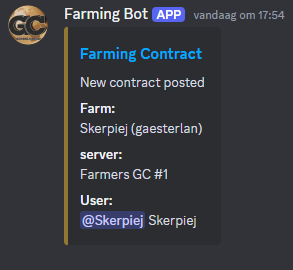
On discord you can easy click on the blue Farming Contract text to go to the contract right away and see more details.
Every Contract will be diffrent as they are made by the farmer and they will tell you in the contract what they expect from the Contractor(you) Contracts that have the status new or accepted can be accepted if the amount of currently working people are not reached yet (if someone pressed stop working it can be taken again)
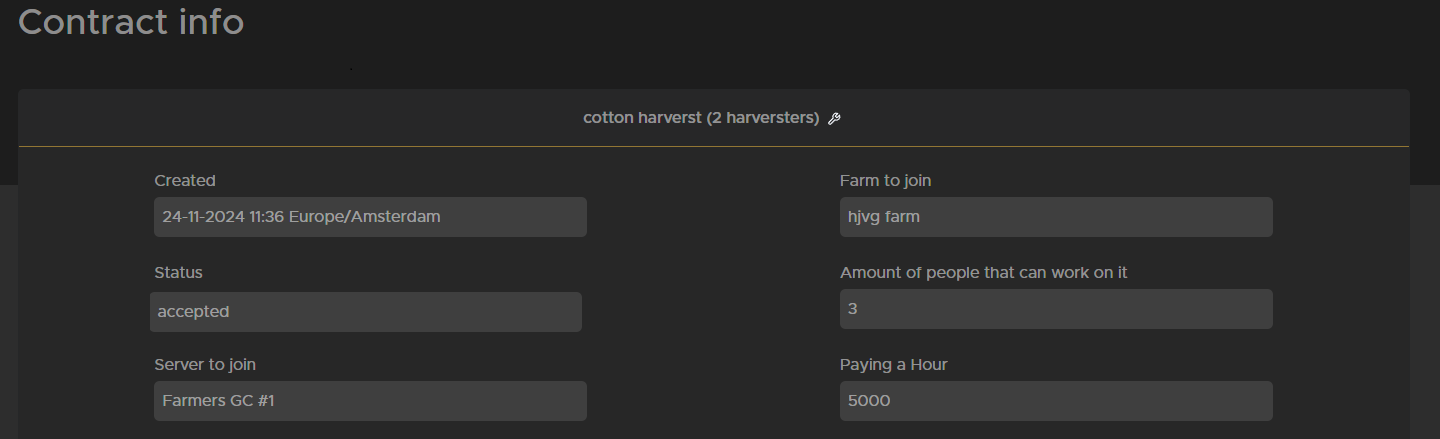
The picture above shows when the contract got posted, which farm that needs help, if its still new, accepted or waiting for payment, how many people can work on it, server name, and payment for a hour work. Below this you will find a explanation from the farmer what you need to do and if you scroll all the way to the bottom of the page you can see if someone is still working on it or did stop working.
When doing the contract be sure you use the equipment of the farm you are helping.
Steps for completing an contract:
- Read the contract see whats needs to be done as long as the contract does not have the status waiting payment it should be still avaible.
- Login on the server where the contract is posted for and join the farm that posted it.
- Press start working on Trucksweb when you are ready to start working.
- When done or taking a long brake (more then 10 min or multiple breaks) press stop working on the site again so the farmer knows how long you worked.
- If all work is completed and you pressed stop working you can press work completed. if its not done yet dont press it so someone else can take it.
- when the work is completed the farmer will pay you as soon as possible and the money will be added to your farm account on trucksweb.